Clipboard · 5 min read
Flycut vs Tegaro
Tegaro is better if copied-image OCR and quick paste matter. Flycut is stronger as a free, focused clipboard history.
Flycut is a free, open-source clipboard manager for text. Here is how it compares with Tegaro's clipboard history for text and images.
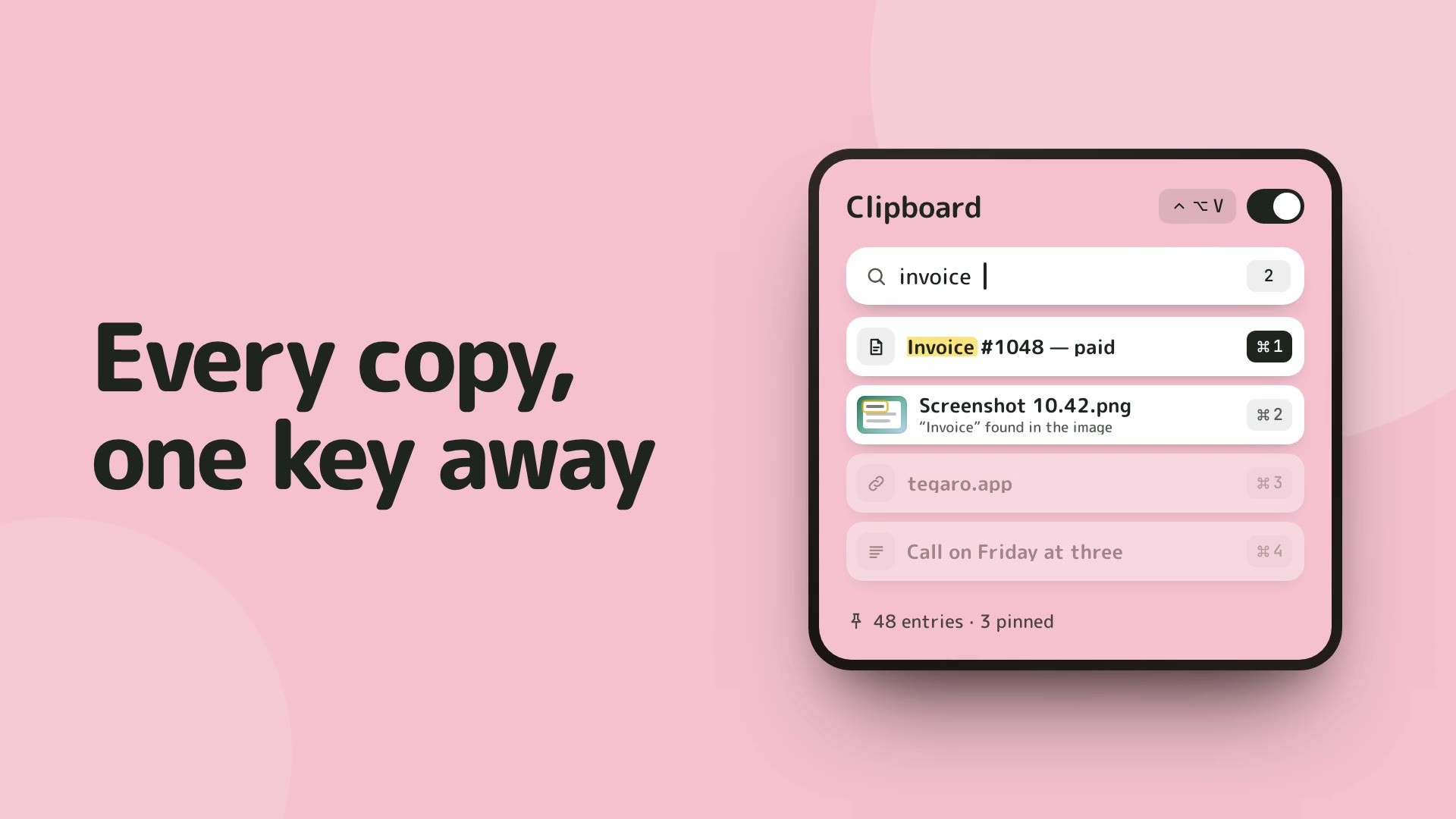
Flycut and Tegaro are both clipboard tools for Mac. Flycut is free and open source, and it keeps a history of copied text that you step through in a small on-screen window. Tegaro's Clipboard keeps text and images, lets you paste recent items with ⌘1–9 and searches inside screenshots. Tegaro is part of a ten-tool menu-bar app, and Clipboard needs Pro after the 14-day trial.
OCR inside copied images
Search can find recognised words inside copied screenshots.
One-step quick paste
The first nine recent items can be pasted with Command-1 through Command-9.
Opt-in local history
Clipboard history starts only after you enable it.
At a glance
| Capability | Flycut | Tegaro |
|---|---|---|
| What it keeps Tegaro's history includes copied images | Text | Text and images |
| Text from the screen Tegaro reads text from the screen on your Mac | No | Yes (in the Screenshots tool) |
| Search inside screenshots Find a past screenshot by words that appear in it | No | Yes (Clipboard search) |
| Quick pasting with ⌘1–9 Paste recent items by number | No (you step through the history) | Yes |
| Look and feel Both open from a keyboard shortcut or the menu bar | Small on-screen pop-up | Menu-bar panel with search |
| Privacy Review the relevant feature and provider privacy documentation. | Free and open source; you can read the code on GitHub | Core typing, copied-content and downloaded-model dictation workflows are local; separate services can have their own network behaviour |
| Other tools Tegaro puts ten tools in one menu-bar icon | None (clipboard only) | Displays (brightness, resolution, Dock copy), Power (battery and load readouts), Screenshots, Dictation, typing fix |
| Pricing & Licensing Clipboard needs Pro after the trial | Free (open source on GitHub) | 14-day all-tools trial; Free limits; Pro: $1.99 first month, then $4.99/month, $29.99/year or $100 lifetime |
When to Choose Flycut
People who copy mostly text, want a free open-source tool, and are happy to step through a short history in a small pop-up.
When to Choose Tegaro
People who copy images and screenshots as well as text, want to paste recent items with ⌘1–9 and search inside screenshots, and want screenshots, dictation and display tools in the same app.
Tegaro tools, one icon
Typing · Clipboard · Screenshots · Dictation · Displays · Power · Disk · Sound · AI Usage · Critter
Current Tegaro access
Try every Pro tool for 14 days without a card or account. Afterward, Free keeps Classic, Cat and Dog, Power, Sound, AI Usage, normal Displays and Disk analysis; it includes 100 successful automatic layout fixes per calendar month and 2,000 delivered dictation words per Monday-starting week. Pro unlocks Clipboard, Screenshots, Disk cleanup and app removal, unlimited layout automation and dictation, more critters and compatible EDR brightness. A $100 lifetime license covers one person on up to three Macs.
Pricing and terms: Flycut
Free (open source on GitHub)
Tegaro: 14-day trial; Pro is $1.99 for the first month, then $4.99/month, $29.99/year, or $100 lifetime for one license on up to three Macs. Post-trial module access varies by module. Check Flycut's official page for its current price and regional terms.
Offers: Flycut
No public promotion is asserted here; check the official checkout for current offers.
Tegaro trial offer
Eligible trial users may receive a one-time 30% annual or lifetime offer valid for 48 hours. It is optional, not a promised public price.
Privacy and footprint
Tegaro runs its core typing, clipboard and downloaded-model dictation workflows locally. AI usage may query Claude or Codex providers using existing authentication; licensing checks, downloads, updates and opted-in email have separate network behaviour. Review each product’s privacy documentation for the feature you use.
Native macOS app built with Swift.
Core typing, copied-content and downloaded-model dictation workflows stay local. Licensing, optional renewal lookups, model downloads, opted-in diagnostics and direct AI-provider checks are separate network actions. AI Usage uses existing provider sign-in and does not send provider credentials to Tegaro.
How to Switch from Flycut to Tegaro
- Note the shortcut you use to open Flycut.
- Open Tegaro and turn on Clipboard. It is off by default.
- Copy an image or screenshot and try pasting recent items with ⌘1–9.
- Quit Flycut and turn off its launch at login if you are switching fully.
Frequently asked questions
Can Tegaro keep images and screenshots, which Flycut does not?
Yes. Flycut keeps text only. Tegaro's Clipboard keeps text and images, and it can search for words inside screenshots.
How does Tegaro read text from images?
Tegaro reads text from the screen on your Mac. In Clipboard you can search for words inside a copied screenshot, and the Screenshots tool can read text from the screen.
Is my clipboard data kept private in Tegaro?
Yes. Tegaro needs no account, and is not uploaded. What you copy stays on your Mac, and Clipboard is off until you turn it on.
Sources and disclosure
Published by Tegaro. App information is checked against the linked official pages on the date shown. Checked: 2026-10-07.